Revit Family Creation: Custom Parametric Content for Faster BIM Modeling.
Most Revit project delays trace back to one habit: modeling the same type of component over and over with generic, out-of-the-box content. Revit modeling services that invest in custom, parametric families cut that repetition out of the workflow, which is why firms that build their own content libraries consistently model faster and coordinate cleaner than firms that don't.
Key takeaways
- Custom Revit families remove repetitive modeling work by replacing manual geometry-building with parametric, reusable components.
- Generic manufacturer or library families often carry more detail (and file weight) than a project needs at early design stages.
- Discipline matters: architectural, structural, and MEP families need different parameter sets and LOD targets.
- Naming conventions and shared parameters determine whether a content library stays usable past one project.
- Family performance testing, not just creation, is what keeps large models from slowing down.
What Are Revit Family Creation Services?
Revit family creation services involve developing custom, intelligent BIM components in Autodesk Revit for architectural, structural, and MEP projects.
These families contain geometry, parameters, dimensions, and technical information tailored to specific project requirements.
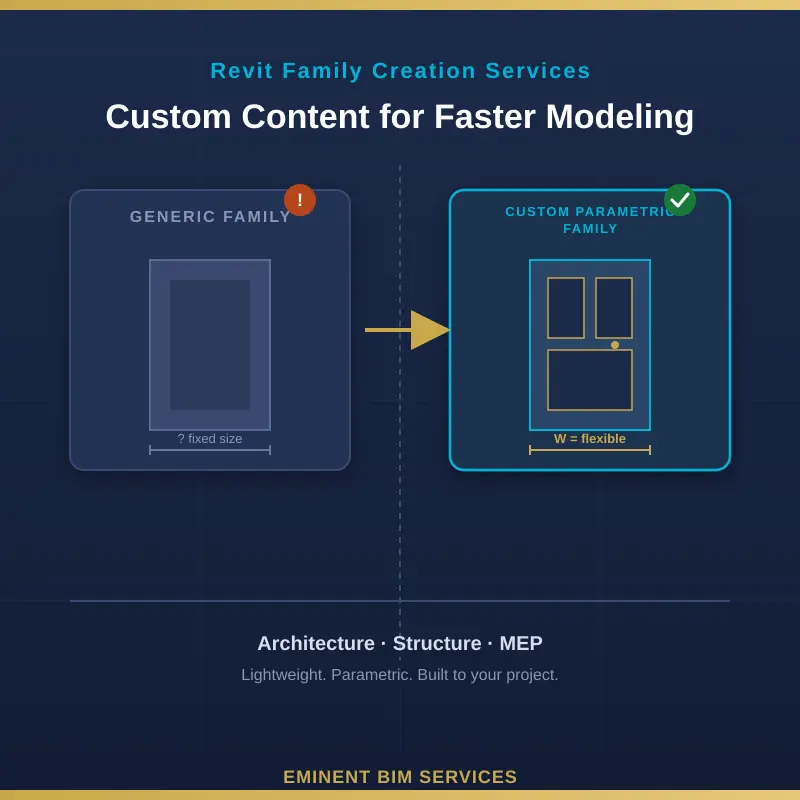
Unlike generic Revit families, custom families can be designed to match project specifications, manufacturer data, and required levels of detail. Well-developed parametric families allow modelers to adjust dimensions and properties without rebuilding components from scratch.
What Is Custom Revit Content?
Custom Revit content is any family, component, or template built specifically for a project or client rather than pulled unmodified from Revit's default library. It ranges from a single bespoke door family to an entire managed content library shared across a firm.
Custom Revit Families
A custom family is built to match exact specifications: a manufacturer's actual dimensions, a client's standard detail, or a recurring project condition. Unlike a generic placeholder, it carries the right geometry and data from day one, so nobody has to go back and fix it during documentation.
Parametric BIM Components
Parametric families use formulas and constraints, not fixed geometry, so one family type can flex across dozens of sizes and configurations. A single parametric door family with width, height, and swing parameters replaces what would otherwise be a dozen separate static families.
Reusable Revit Content Libraries
Individual families are only half the value. A managed library - version-controlled, consistently named, tested across project types - is what turns one-off custom content into a repeatable advantage instead of a one-time favor.
How Custom Revit Content Makes Modeling Faster
Speed gains here are not abstract. They show up in specific, repeatable ways across a project's lifecycle.
Reduces Repetitive Modeling Tasks
Modelers stop rebuilding the same casework, light fixture, or structural connection from scratch on every project. They place a tested family and move on. On a mid-size commercial job, that alone can remove dozens of hours of redundant family-building.
Improves Modeling Accuracy and Consistency
Every instance of a custom family shares the same geometry and parameters, so a window scheduled on sheet A201 matches the one modeled in the 3D view. Generic, mismatched families are a common source of quantity takeoff errors that only surface during construction.
Simplifies Design Changes
Change a dimension or a parameter in one type, and every instance updates. Teams working with unparametrized or generic content often re-model affected elements by hand - a cost that compounds with every design revision.
Supports Better BIM Coordination
Custom MEP and structural families with correct connectors and real geometry produce fewer false clashes in Navisworks. A duct fitting modeled as a rough block, instead of an accurate family, routinely triggers clash reports that waste coordination-meeting time on problems that don't actually exist.
Types of Custom Revit Content for Different Disciplines
Custom content isn't one-size-fits-all. Each discipline needs different data embedded in its families.
Architectural Revit Families
Doors, windows, casework, curtain wall systems, and furnishings built to match actual specifications, finish schedules, and manufacturer catalogs rather than approximate stand-ins.
Structural Revit Families
Connections, braces, foundations, and framing families that carry accurate structural parameters, often tied directly to analysis data so the model stays usable for both documentation and engineering checks.
MEP Revit Families
Ductwork, piping, fixtures, and equipment families with correctly placed connectors, flow data, and system classifications - the detail that determines whether automated clash detection and system routing actually work.
Best Practices for Developing Custom Revit Content
Define Project Requirements
Start with the LOD target and the discipline's actual use case - documentation, coordination, or fabrication - before building geometry. A family built for LOD 400 fabrication detail is overkill, and a performance drag, at LOD 200 schematic design.
Use Appropriate Parameters and Naming Standards
Consistent naming (family, type, and parameter level) following a recognized framework like the AEC UK BIM Standard keeps a library searchable as it grows. Teams that skip this step end up with duplicate families nobody can tell apart six months later.
Optimize Family Performance
Keep geometry as simple as the LOD allows, limit nested families, and avoid unnecessary parameters. Bloated families are one of the most common, and most preventable, causes of slow Revit models.
Test and Validate Revit Families
Every family should be flexed through its full parameter range and placed in an actual project file, not just checked inside the family editor. A family that looks fine isolated can still fail when hosted on a real wall or system.
Common Challenges in Revit Content Creation
The biggest challenge isn't modeling geometry- it's governance. Firms build good families and then lose track of them: duplicate versions scattered across project folders, inconsistent naming, no owner responsible for updates. A second common problem is over-detailing early-stage content, which slows the whole model down for no documentation benefit. And a quieter one: families built by whoever had time that week, with no shared parameter standard, so schedules and tags break the moment someone swaps a family out.
How to Choose the Right Revit Modeling Services Provider
Look past the portfolio and ask how the provider actually builds content: do they define LOD before modeling, do they follow a documented naming standard, and do they test families inside a real project environment rather than just the family editor? Ask for a sample family file and open it- file size, parameter structure, and nesting depth tell you more about quality than any case study. A provider working across architecture, structure, and MEP disciplines, rather than one narrow specialty, is also better positioned to keep content consistent across a full model.
Custom Revit content is not a nice-to-have add-on to modeling services. It's the difference between a team that models the same component five times a project and one that builds it once, correctly, and reuses it for years. The firms getting real speed gains from Revit are the ones treating their family library as an asset to maintain, not a byproduct of whatever the last project needed.