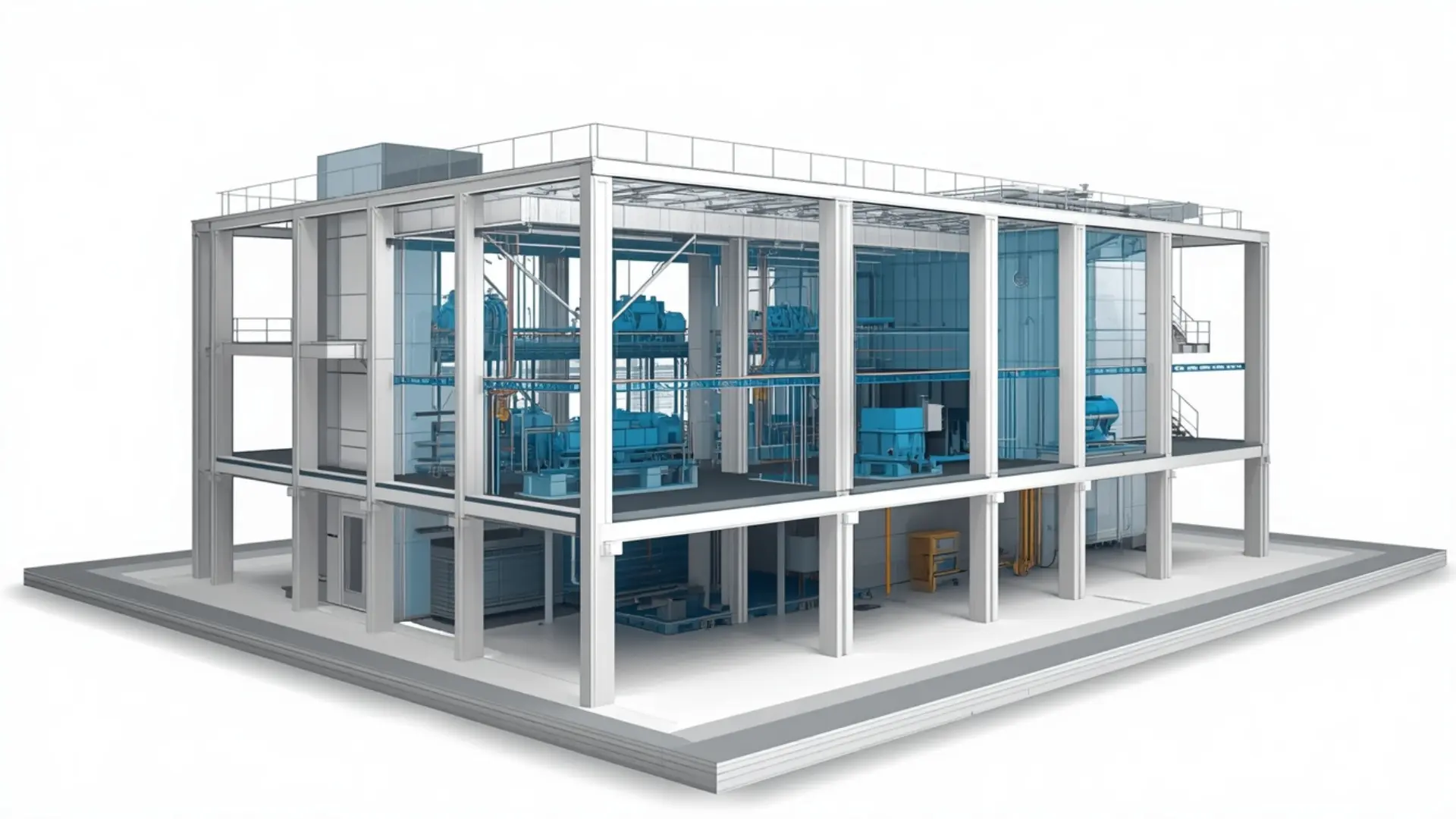
3D MEP BIM coordination model showing integrated mechanical systems and structural framing for a commercial building

BIM Clash Detection Services

Our BIM Clash Detection Services help identify and resolve design conflicts between architectural, structural, and MEP systems before construction begins. Using advanced BIM coordination workflows, we detect clashes, analyze potential issues, and provide detailed reports for timely resolution. Our services help reduce rework, minimize construction delays, improve coordination, and ensure a more efficient and error-free project execution.

3D BIM clash detection model showing HVAC duct and structural steel beam conflict alongside before and after clash resolution steps BIM service

About This Service

BIM Clash Detection Services

Construction problems that show up on site are almost always problems that existed in the drawings first. A duct routed through a structural beam, a pipe running into a column, conduit that leaves no room for a ceiling grid  these aren't unusual. They're the kind of thing that happens when architectural, structural and MEP models are developed in separate packages without a regular coordination check. BIM clash detection services identify those conflicts in the model, before work begins on site.

At Eminent BIM Services, we federate discipline models, run structured clash tests, and issue clear reports so each team knows exactly what needs resolving and where. The process is straightforward, but it needs to be done methodically and with enough lead time for the design teams to act on what they find.

What Is BIM Clash Detection?

Clash detection is the process of combining models from multiple disciplines into a single federated environment and testing them for conflicts. A hard clash is a direct geometric overlap two elements occupying the same space. A clearance clash is where elements don't touch but don't leave enough room for installation, maintenance access, or insulation.

The work is done in Navisworks, which brings together Revit models, IFC files and other formats into one coordinated view. Clash tests are configured by discipline pair structure versus HVAC, for example, or plumbing versus electrical trays and run against the live models. The results are grouped, reviewed and written up in a clash report that each team can work from.

A common example: an HVAC supply duct is sized and positioned correctly within the mechanical model, but when the structural model is brought in, it runs directly through a secondary beam added late in the structural design. That conflict wouldn't appear on 2D drawings without a careful overlay. In a federated 3D model, it's visible immediately.


Our BIM Clash Detection Scope


Model federation and test setup

We bring together discipline models architectural, structural, MEP into a single Navisworks file. Before running tests, we check model origins and shared coordinates, confirm that discipline models are at the correct level and grid, and agree the test matrix with the project team. Running tests without that groundwork produces thousands of false results that take longer to sort through than the actual clashes.

Hard and clearance clash testing

We run hard clash tests across all active discipline pairs and clearance checks where installation tolerances, insulation, access zones or maintenance clearances have been defined. Clearance values are agreed with the client or taken from the project BEP or coordination protocol.

Clash grouping and review

Raw Navisworks results need to be read and sorted before they are useful. We group clashes by type, location and system, remove duplicates and false positives, and assign them to the relevant discipline. Each clash in the report includes a viewpoint, clash location, element IDs and a description of the conflict.

Coordination meetings and resubmission

We support coordination meetings where results are reviewed with the design and construction teams. After each discipline updates their model, we re-run the tests and track which clashes have been resolved, which are still open and whether new clashes have appeared in revised areas.

Ongoing coordination management

On live projects with regular model updates, we manage the coordination cycle receiving updated models, re-running tests, issuing updated reports and maintaining a log of open and closed items.


What We Deliver

  • Federated Navisworks model (.nwf / .nwd)
  • Clash detection reports in PDF, HTML or Excel
  • Navisworks viewpoints for each clash group
  • Coordination issue log (open, in progress, closed)
  • Updated clash reports after model revisions
  • Coordination drawings where required
Files are issued in formats agreed at project start. For teams using Autodesk Construction Cloud, reports and viewpoints can be issued through the project environment directly.

Our Workflow

  1. Receive discipline models - We collect the current Revit models or IFC files from each discipline, along with the project BEP, coordination protocol and any agreed clash tolerances.
  2. Check model setup - We verify shared coordinates, model origins and that all discipline models are referencing the correct levels and grids. Misaligned models produce incorrect clash results.
  3. Build the federated model - Models are assembled in Navisworks. We set up saved discipline selections and prepare the test matrix.
  4. Run clash tests - Hard clash and clearance tests are run for each discipline pair in the matrix. We work through architectural vs. structural, structural vs. MEP, and within MEP sub-disciplines.
  5. Review and group results - We go through the raw results, remove duplicates and false positives, group by system and location, and add descriptions and viewpoints.
  6. Issue the clash report - The coordination report is issued to the project team with a summary of results, open clash count by discipline pair, and prioritised items for review.
  7. Support the coordination meeting - We attend or support the clash review meeting and note resolutions, actions and the model revision schedule.
  8. Rerun after revisions - Once updated models are received, we rerun the tests, close resolved clashes in the log and report any new conflicts.

Level of Development (LOD)

Clash detection works best at LOD 300 and above, when geometry is accurately sized and correctly located in 3D space. At LOD 300, a duct is modelled at its actual dimensions and position- not as a placeholder- so a clash result reflects a real problem.

LOD 350 adds detail that matters for coordination: pipe supports, duct hangers, connection interfaces, and the clearances required for access and maintenance. Clearance clash testing is most meaningful at this level, since it accounts for the space each element actually needs, not just the element itself.

At LOD 200, geometry is approximate and results carry significant uncertainty. We can run tests at this stage as an early coordination check, but the expectation is that results will be reviewed as directional rather than definitive. We'll flag this clearly in the report.

LOD 400 applies where fabrication models are available, typically in MEP spool or structural steelwork. Clash tests at this level are essentially a pre-fabrication check.


Software We Use

  • Autodesk Navisworks - The primary tool for model federation, clash test configuration, grouping, viewpoints and report generation. Navisworks handles Revit, IFC, DWG and a range of other formats, which matters when disciplines are working in different packages.
  • Autodesk Revit - Discipline models are typically developed in Revit. We work directly with .rvt files and can also use Revit's interference check tool for quick intra-model checks during modelling.
  • Autodesk Construction Cloud - For projects using ACC, we can issue reports, viewpoints and coordination issues through the project environment, keeping the coordination log connected to the model.
  • Dynamo - Used for rule-based model checking where quality control or standard compliance checks are required alongside geometric clash testing.

Why Clients Use This Service

The main reason is avoiding expensive surprises on site. When a clash is found during the design phase, the fix is a model revision and a coordination meeting. When the same clash is found after installation, it means cutting out completed work, sourcing materials, rescheduling trades and dealing with the programme impact.

Beyond cost, regular clash detection helps the design teams communicate. It creates a shared view of where conflicts exist and gives each discipline a clear record of what they need to revise. That's particularly useful on projects where architectural, structural and MEP teams are working in separate offices or across different time zones.

It also reduces the volume of RFIs during construction. A coordinated model that has been through several rounds of clash detection gives the site team more reliable information to build from, and the design team fewer queries to manage mid-construction.

Projects We Support

Commercial and office buildings - Multi-storey commercial buildings involve dense MEP routing through structural frames, which generates a high clash volume without coordination. We work on both design-stage and construction-stage coordination for these projects.

Hospitals and healthcare facilities - These projects carry large and complex MEP loads across multiple floors, with strict clearance and access requirements. Clash detection is typically required at LOD 350 to capture support clearances and maintenance zones.

Hotels and residential developments - Repetitive floor plates mean clashes often repeat across levels. Identifying and resolving them early, before they propagate through every typical floor, makes a measurable difference.

Industrial and data centre projects - High-density mechanical and electrical systems in constrained spaces make coordination-intensive. Clash testing across structural steel, HVAC, cable management and pipework is usually ongoing through design and construction phases.

Educational and public sector buildings - BIM coordination is often contractually required on public-sector work. We produce the reports and logs needed to meet employer's information requirements.

Why Work With Eminent BIM Services?

We work across architectural, structural and MEP disciplines on the same project, which means the coordination process stays with one team rather than being split between modellers who may not communicate well with each other. That matters when clashes span discipline boundaries and need a clear owner for each item.

We work to client standards: project BEPs, clash tolerances, test matrices, naming conventions and report formats. If a contractor or employer has a specific coordination protocol, we follow it rather than issuing output that needs to be reformatted.

Our team understands construction, not just modelling. Clash reports that identify 4,000 conflicts are not useful if 3,000 of them are trivial or duplicates. We invest time in reviewing and grouping results so the reports we issue reflect actual coordination problems.

We also support international projects UK, US, Middle East, Australia and are familiar with ISO 19650 workflows, common data environments and the coordination requirements that come with larger projects.

Get in Touch

If you have discipline models ready for coordination, or a project coming into the design development phase where clash detection will be required, send us the available information. Our team can review the model scope, agree the test matrix and discuss report formats and coordination cycle requirements with you.
Software Used
Navisworks Revit AutoCAD BIM 360
FAQ
BIM Clash Detection helps reduce costly site issues, improve project quality, optimize construction sequencing, enhance communication, and increase overall project efficiency.
Revit models from each discipline are the starting point, along with any project BEP, clash tolerance values and a note on which discipline pairs need to be tested. If models aren't in Revit, we can work with IFC or DWG files in most cases.
We most commonly work at LOD 300 and LOD 350. LOD 300 is standard for coordination during design development; LOD 350 is used where connection details, supports and access clearances need to be checked. We'll confirm what's appropriate based on the current model state.
We run tests across architectural, structural and MEP disciplines, and within MEP sub-disciplines HVAC, plumbing, electrical, fire protection. The test matrix is defined at the start of the coordination scope.
False positives are reviewed and removed before the report is issued. Elements with permitted overlaps such as bolts through plates or elements that share a common face by design are filtered from the results.
Yes. If the project has a BEP, MEP coordination protocol or employer-defined clash test matrix, we follow it. We can also help draft a coordination protocol if one doesn't exist yet.
We can support coordination meetings remotely, presenting results and recording actions directly in the coordination log. If the project team uses a shared issue tracker or ACC for this, we can work within that environment.
A first-run report on a mid-sized building with three to four disciplines typically takes two to three days, depending on model size and the complexity of results. Subsequent cycles after model updates are usually faster.
Yes. We work on projects across the UK, US, Middle East and Australia. We're familiar with ISO 19650 requirements and can work within common data environments such as Autodesk Construction Cloud, Asite and others.

Let's Deliver BIM the Right Way

Partner with our clash-free coordination and Revit modeling experts to keep your project on time, on budget, and fully coordinated.

Get Free Consultation See Our Work