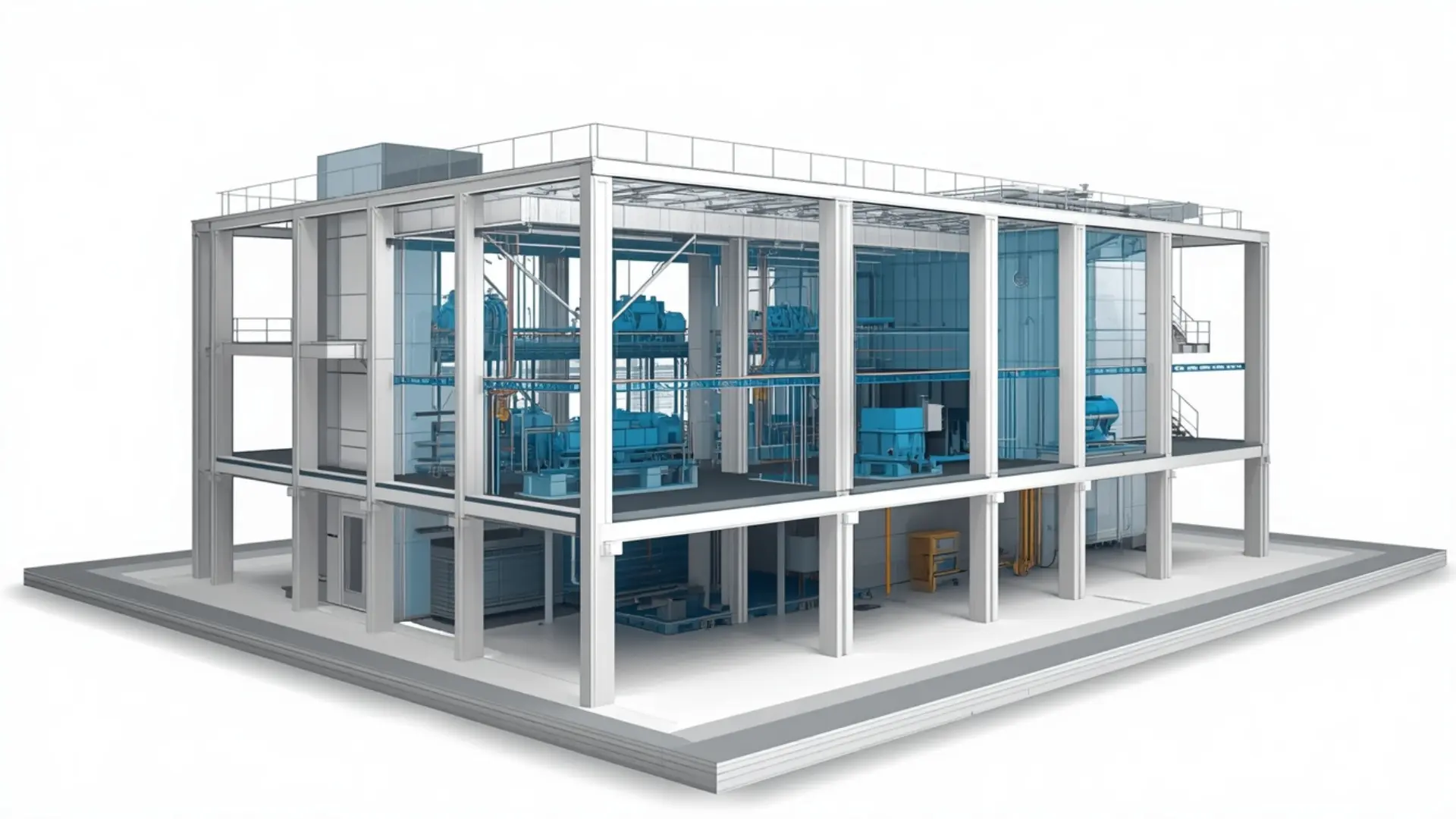
3D MEP BIM coordination model showing integrated mechanical systems and structural framing for a commercial building

Architectural BIM Modeling Services

Our Architectural BIM Modeling Services deliver accurate, detailed, and coordinated digital building models from concept design through construction documentation. We create intelligent Revit-based models that help architects, contractors, and developers visualize designs, improve coordination, reduce errors, and streamline project delivery.

Modern commercial building showing a split 3D Revit architectural BIM model alongside 2D CAD floor plans and drafting blueprints BIM service

About This Service

Architectural BIM Modeling Services

When a project moves from design intent into something that can actually be built, the quality of the architectural model determines how smoothly that transition goes. Architectural BIM modeling services turn design information whether that's CAD drawings, PDFs, sketches, or a partially built Revit model  into a coordinated, documented building information model that can support design development, contractor coordination, and construction documentation. At Eminent BIM Services, our team works with architects, design firms, developers, and main contractors who need reliable Revit modeling and architectural documentation without stretching their in-house capacity.

What Is Architectural BIM Modeling?

Architectural BIM modeling is the process of building a parametric 3D model of a project's architectural elements - walls, floors, roofs, ceilings, doors, windows, stairs, ramps, finishes - within software like Autodesk Revit. Unlike drafting in CAD, a Revit model carries geometry and data together. Change a wall type and the schedules update. Move a door and the plan, section, and elevation all reflect the change.

That coordination between geometry and information is what makes it useful on a real project. If a contractor wants to check room areas, the model has them. If the architect needs a window schedule by type and elevation, it comes from the model rather than being counted by hand. If a structural or MEP team needs to federate disciplines into a coordinated model, the architectural model is the starting point.


The practical benefit isn't that BIM is more advanced than CAD. It's that a well-built Revit model reduces the time spent finding and correcting conflicts between drawings, and gives the wider project team something they can actually work from.

Our Architectural BIM Modeling Scope


Model Development

We build Revit models from architect-supplied CAD drawings, PDFs, scanned drawings, sketches, or existing models that need to be updated or reconstructed. We model all standard architectural elements - walls, columns, floors, roofs, ceilings, doors, windows, curtain walls, stairs, handrails, ramps, and fit-out elements where required. Families are set up to suit the project requirements: either using the client's existing Revit template and families, or building appropriate ones where none exist.

Drawing Preparation and Documentation

Once the model is developed to the required level, we set up sheets and prepare construction documentation - floor plans, reflected ceiling plans, sections, elevations, enlarged details, and annotations within the client's drawing template and to their drawing standards.

Schedules

Room schedules, door and window schedules, finish schedules, and wall type legends are built from model data, so they remain coordinated with the geometry as the design develops.

Model Updates and Revisions

Design changes happen on every project. We incorporate architect-issued revisions, update affected drawings and schedules, and maintain revision tracking within the model or on sheets as required by the project's documentation protocol.

Coordination Support

Where the project involves multiple disciplines, we can prepare the architectural model for federation with structural and MEP models, and check for obvious spatial conflicts before formal clash detection is run. We work to the BIM Execution Plan (BEP) requirements where one is in place, including file naming, shared coordinates, workset setup, and model phasing.

What We Deliver

Typical deliverables from an architectural BIM modeling engagement include:

  • Revit model file (.rvt) developed to the agreed LOD
  • Floor plans, reflected ceiling plans, sections, elevations, and detail sheets
  • Door, window, room, and finish schedules
  • PDF and DWG exports of issued drawing sets
  • Revision clouds and revision logs on sheets
  • Model documentation (view templates, sheet index, workset list) where required

Files are issued via Autodesk Construction Cloud, shared drives, or whichever file transfer method the client uses. We work in the client's Revit template where one is provided, or set up a clean project file using current Revit standards.

Our Workflow

Project information review: We review all architect-supplied information- CAD drawings, PDFs, existing Revit models, sketches, specification notes - and flag anything missing before we start modeling.
Project setup: We set up the Revit project file to the client's template, coordinate system, worksets, and BEP requirements. If no template is provided, we set one up and confirm it with the client before proceeding.
Model development: Architectural elements are modeled level by level, beginning with building shell, structure-facing elements, and primary vertical and horizontal geometry, then moving through interior partitions, openings, stairs, and fit-out as applicable.
Drawing and schedule preparation: Views and sheets are set up in line with the drawing register. Schedules are built from model data and checked against the design drawings.
Internal quality check: We review the model and drawings before issuing: checking plan/section/elevation consistency, schedule accuracy, model cleanup, and compliance with the agreed LOD.
Client review and comment: The model and drawings are issued for the client's review. We provide a marked-up list of open questions or flagged items where needed.
Revisions. We incorporate feedback and reissue the affected drawings.
Final delivery: The completed model and drawing package are issued in the agreed formats.

Level of Development (LOD)

LOD defines how much geometric detail and data the model contains at each stage. For architectural BIM modeling services, the relevant range is typically LOD 200 to LOD 350.

LOD 200 covers approximate geometry — enough for massing, area studies, or early design review. Walls and floors are modeled to approximate dimensions, materials may be generic, and openings are represented but not yet coordinated with schedules.

LOD 300 is the standard for construction documentation. Geometry is accurate in size, shape, and location. Door and window families are dimensionally correct. Room areas and wall assemblies reflect the design intent. This is the level at which drawings can support contractor tendering, permit applications, and coordination with other disciplines.

LOD 350 adds connection and interface information — wall connections at floor slabs, door frame clearances, ceiling framing heights. It's used where the architectural model needs to coordinate closely with structural or MEP elements, for example where penetrations through walls or slabs need to be modeled before MEP coordination is finalised.

Most design development and construction documentation work sits at LOD 300. We confirm the required level before starting and document it in the project setup.

Software We Use

  1. Autodesk Revit - primary modeling and documentation platform for all architectural BIM work
  2. AutoCAD - for referencing CAD drawings during model build and exporting DWG output
  3. Navisworks - for federating the architectural model with structural and MEP models for coordination review
  4. Autodesk Construction Cloud - for model sharing, file management, and issue tracking where the project is set up on that platform

Projects We Support

Our architectural BIM modeling work covers a range of building types:

Commercial and office buildings: tenant fit-outs, base-build cores, mixed-use podiums, where documentation precision and revision management matter throughout the design process.

Residential developments: apartment blocks, housing schemes, and mixed-tenure projects where repeat elements benefit from a well-structured Revit model with properly organised room data and finish schedules.

Hospitality and healthcare: hotels and hospital projects where room data management, finish scheduling, and coordination with MEP services are closely linked.

Educational and institutional buildings: schools, universities, and civic projects that require detailed documentation and often involve multiple consultants working from a shared model.

Industrial and data centre projects: where architectural documentation is secondary to MEP and structural work, but still needs to be coordinated and issued accurately.

Why Work With Eminent BIM Services?


We work across multiple disciplines - architectural, structural, and MEP - which means we understand how architectural models are used by the wider project team, not just by the architect. That shapes how we build models: worksets are organised sensibly, shared coordinates are set correctly, and elements are modeled in a way that supports coordination rather than creating problems downstream.
We work to client standards. If there is a BEP, a Revit template, a file naming convention, or a drawing register, we follow it. For clients without established BIM standards, we set up the project clearly and document what we've done.
Our team handles revision management as part of the service, not as an afterthought. On longer projects, keeping track of what changed in which revision and making sure those changes are reflected accurately across drawings and schedules is where time is typically lost. We manage that systematically.
We support projects in the UK, Middle East, US, Australia, and other markets, and are familiar with the documentation requirements and drawing standards that apply in each.
Software Used
Revit AutoCAD Navisworks
FAQ
Architectural BIM modeling improves design accuracy, reduces on-site errors through early clash detection, enhances collaboration between teams, and generates highly accurate construction documentation directly from the 3D Revit model.
CAD drawings or PDFs are sufficient to start in most cases. If there is an existing Revit model, we can work from that. We also work from scanned drawings, sketches, and mark-ups. At the start of a project, we review whatever is available and confirm what we can model from it.
For most construction documentation work, we model to LOD 300. Where the project requires interface and connection information for coordination with structural or MEP, we can work to LOD 350. We confirm the required level before starting and document it.
Yes. We prefer to use the client's existing template, family library, and drawing standards. If you don't have a template, we can set one up and confirm it with you before we begin.
Yes. Revision management is a standard part of our architectural BIM modeling service. We track design changes, update the model and drawings, and maintain the revision log on sheets as required.
We prepare the architectural model for federation and can carry out a basic coordination review against structural or MEP models. For formal clash detection with full reports and coordination meetings, that is a separate scope, but it can be combined with architectural modeling if needed.
Standard deliverables are the Revit model (.rvt), PDF drawing sheets, and DWG exports. We can also provide IFC exports for open BIM workflows. Format requirements are confirmed at project setup.
We work with Autodesk Construction Cloud, shared drives, FTP, or email for smaller packages. For projects on a CDE, we follow the upload and issue procedures already in place.

Let's Deliver BIM the Right Way

Partner with our clash-free coordination and Revit modeling experts to keep your project on time, on budget, and fully coordinated.

Get Free Consultation See Our Work